
Platform tools
Division Hierarchies
Browse MasterFormat from broad divisions down to more specific classifications.
Browse MasterFormat classifications
Select an edition such as MasterFormat 2026 or MasterFormat 2020. Search for a classification or expand the hierarchy to explore the classifications beneath it.
When should I use this?
Use Division Hierarchies when you want to explore a subject instead of searching for one exact classification.
- You know the general division but not the exact classification.
- You want to see how a subject is organized.
- You want to compare classifications at the same level.
- You want to find the appropriate level of detail.
Find a starting branch
- Select the classification system and edition.
- Choose Classification & Title for precise results or Title & Explanations for a broader search.
- Enter a division, classification, title, or keyword.
- Select a suggestion, press Enter, or select the search button.
- Open a result and expand its children.
Search examples
03 81 00or038100finds an identifier with or without spaces.Concrete Cuttingsearches by title.03 81*orfinish*uses a wildcard to match different endings."Wood Trim"finds that exact phrase.
Explore the tree
├── [CHILD RECORD]
│ ├── [MORE SPECIFIC RECORD]
│ └── [MORE SPECIFIC RECORD]
└── [CHILD RECORD]
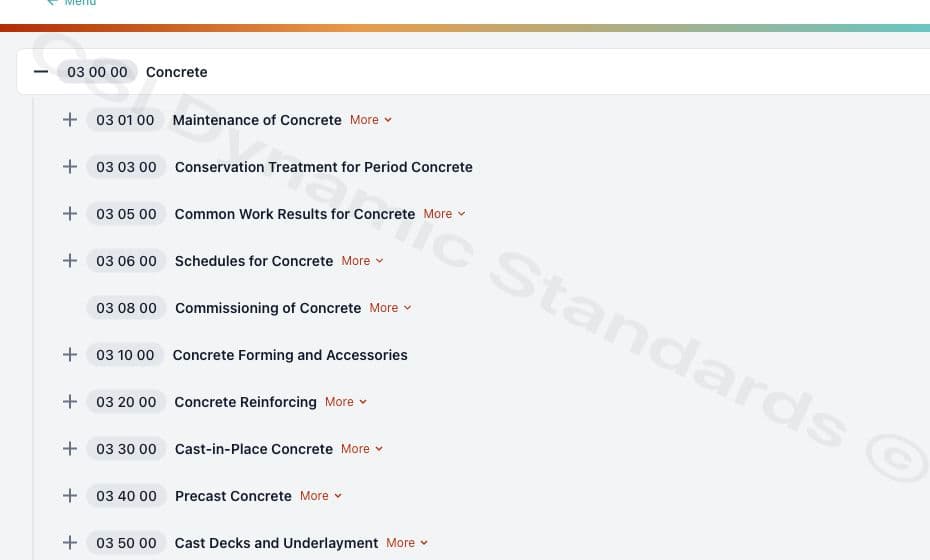
Expand one branch at a time. Start broadly—for example, with 03 00 00 or Concrete—then drill down toward a more specific record such as 03 20 00 or Concrete Reinforcing. Open the details control when the tree alone does not provide enough scope or explanatory context.
Learn more about a classification
Some MasterFormat 2026 classifications include guidance beyond their number and title. Select More to view the additional information available for that classification.
- Includes — what the classification covers.
- Does Not Include — related work that belongs under another classification.
- Definitions — additional explanation of terminology.
- Notes — guidance about how the classification is used.
- See Also — related MasterFormat classifications that may also be relevant.
- Numbering recommendations — guidance such as a Level 4 Numbering Recommendation for creating more detailed classifications where applicable.
Not every classification contains every type of additional information.
Example
32 00 00 — Site Improvements includes additional information describing what Site Improvements includes and excludes, definitions that provide context, and related classifications such as Earthwork and Utilities.
See changes in MasterFormat 2026
When browsing MasterFormat 2020, a classification with edition-change information can display Transitions. Select it to see the corresponding MasterFormat 2026 classification or classifications and the available type of change.
Save classifications
Use Copy to clipboard beside a tree item to save its identifier and title. You can add notes and copy all saved classifications when you are ready to use them elsewhere.